
Carlson GeoTech
$1,595.00
Carlson GeoTech can be purchased as a standalone module or as part of the Takeoff Suite which also includes Construction, CADNet and Trench. It can run standalone with the included license of IntelliCAD or on top of a separately purchased license of full AutoCAD.
See Available Discounts in Cart
Description
Carlson GeoTech can be purchased as a standalone module or as part of the Takeoff Suite which also includes Construction, CADNet and Trench. It can run standalone with the included license of IntelliCAD or on top of a separately purchased license of full AutoCAD.
Carlson GeoTech and other programs of the Takeoff Suite includes features that are most comparable to construction estimating software such as Paydirt, Quest and Agtek. However, the program also contains much of the same general functionality of the civil design components of programs such as: DCA/Softdesk/Land Desktop, AutoCAD Map, Civil 3d, Raster Design, Eagle Point, TerraModel, GeoPak and InRoads.
All Carlson Software purchases will be delivered by email with your new serial number and download instructions within two business days.
Features
Key Capabilities
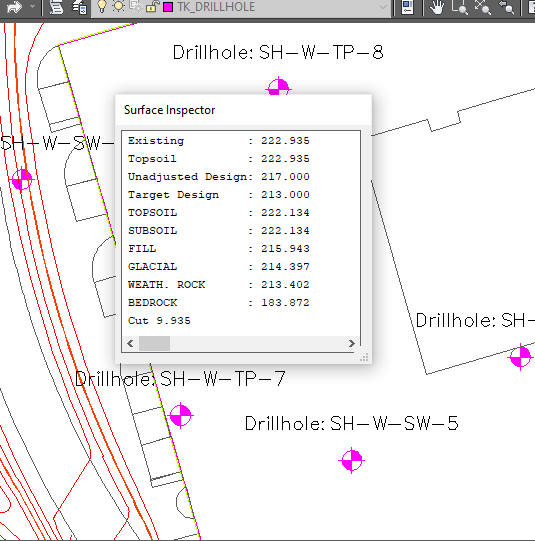
- Input and edit drillhole log data with strata elevation, depth and attribute data
- Generate drillhole log reports
- Label drillholes
- Draw Geologic Columns
- Draw Fence Diagrams
- Draw Isopach Maps for strata thickness, elevation or attributes
- Draw Strata Surfaces
- Draw Strata Depth Contours and Cut Color Maps
- Model Strata Surfaces with linkage to Carlson Civil and Construction for strata quantities
- Annotate plan view drillhole location maps
General
Built on AutoCAD and IntelliCAD
Carlson GeoTech will run in AutoCAD®, versions 2010 to current, as well as AutoCAD® Map, Land Desktop and Civil3D and also on IntelliCAD.
Allows users to do the following:
Input and edit drillhole log data with strata elevation, depth and attribute data
Input and edit drillhole log data with strata elevation, depth and attribute data
Drawing Cleanup
Fix common drafting errors
Drafting Enhancements
Handy tools for working in AutoCAD® such as Join Nearest, Shrinkwrap Entities, Polyline Utilities, Drawing Inspector, Layer Inspector and Twist Screen
Data Compatibility
Supports industry standard LandXML and scores of specific data conversions
Surfaces
Build Surfaces
By triangulation or rectangular grids
Contouring
One step triangulate and contour from 3D entities as well as contouring from surface files
Surface Manager
Change surface display properties and adjust surface functions to add and remove points and breaklines and swap edges
Volumes
Earthwork volumes between triangulation or grid surfaces
Pad Design
Tie cut/fill slopes from pad perimeter to surface, build pad surface, calculate and balance volumes, and edit pad parameters
Screenshots
System Requirements
For Carlson’s CAD-based products
Carlson products installed on top of IntelliCAD or AutoCAD are subject to the same requirements as the CAD engine itself. Please follow the requirements for your CAD platform below and allow an additional 750 MB of hard-drive space for the Carlson application.
IntelliCAD (included)
Carlson 2027 runs on IntelliCAD 14.1, with IntelliCAD 13.1 also provided for legacy compatibility.
- Compatible with 64-bit Windows 8.1, 10 and 11
Hardware
Intel® i9, i7 or at least i5, AMD Ryzen 7/9, or comparable processors are recommended. Due to the variety of processors on the market, you can use cpubenchmark.net/cpu_list.php to compare them. While the overall processor score matters, single-thread performance is of the most interest.
- 64-bit Windows 8-11: 8 GB of RAM minimum, 16+ GB recommended
Graphics card compatible with OpenGL version 1.4 or higher:
- Discrete desktop-level graphics cards are recommended (not integrated graphics such as Intel HD)
- Nvidia is preferred due to more consistent driver support
- Discrete AMD cards are adequate, but AMD driver support has been spotty and users are often referred to the computer manufacturer for support
- High-end graphics cards are not required apart from demanding actions in Carlson Point Cloud. Gaming cards often provide better value than workstation cards, and more memory or a better CPU will generally help more than a high-end graphics card
Learn more about IntelliCAD.
Embedded AutoCAD® OEM engine
Carlson Survey OEM 2026 (AutoCAD 2026 embedded)
- 64-bit Microsoft® Windows 11 and 10
- Basic: 2.5-2.9 GHz processor with 8 logical cores; recommended: 3+ GHz processor
- 8 GB RAM (minimum), 16 GB (recommended)
- 10 GB free disk space for installation (SSD suggested)
- 1920 x 1080 monitor; resolutions up to 3840 x 2160 supported
- Display card with 2 GB GPU memory, 29 GB/s bandwidth and DirectX 11 compliance; 8 GB GPU memory with 106 GB/s bandwidth and DirectX 12 recommended
Carlson Takeoff R13 (AutoCAD 2022 embedded)
- 64-bit Microsoft® Windows 11 and 10
- Basic: 2.5-2.9 GHz processor; recommended: 3+ GHz processor
- 8 GB RAM (minimum), 16 GB (recommended)
- 10 GB free disk space for installation
- 1920 x 1080 monitor; resolutions up to 3840 x 2160 supported
- Display card with 1 GB GPU memory, 29 GB/s bandwidth and DirectX 11 compliance; 4 GB GPU memory with 106 GB/s bandwidth and DirectX 12 recommended
- Install from download
AutoCAD® purchased separately
Carlson 2027 is compatible with AutoCAD® 2027. Please see the AutoCAD system requirements for specifications, which are subject to change without advance notice. See above for the hard-disk space needed for the Carlson application.
PhotoCapture Standalone
| Hardware | Minimum | Recommended |
| CPU | Intel i9 / AMD Ryzen 7 | Intel i9 14th gen / AMD Ryzen 9 |
| CPU cores | 8 / 8 | 24 / 16 |
| CPU threads | 16 / 16 | 32 / 32 |
| RAM | 32 GB | 64 GB or more |
| NVMe SSD | 1 TB free | 2 TB or more free |
| Graphics card | Nvidia GeForce* | Nvidia GeForce* |
* PhotoCapture does not use the GPU, but Nvidia GeForce series cards are recommended for other Carlson Software products.
Videos
Free Support
Carlson Software Works For You
A customer’s relationship with Carlson Software goes beyond simply purchasing our software – with Regional Managers throughout the country, free technical support for life, and training options for any budget – we’ve got you covered!
Carlson Software Direct Technical Support
- Hours: Monday – Friday, 8:00 AM – 6:00 PM (EST)
- E-mail: moc.wsnoslrac@troppus
- Problems/Suggestions: Send in a report
- Telephone: 606-564-5028
- Fax: 606-564-6422